- Industry insights
- People in tech
- Product development
- Tech trends at BEECODED
- 1 Sep 2025
The Future of Finance: Touchless AP Automation with BEE CODED
As we can guess from the name, “touchless” means you no longer have to manually process every invoice by hand.

Table of contents
- What does "Touchless AP" mean?
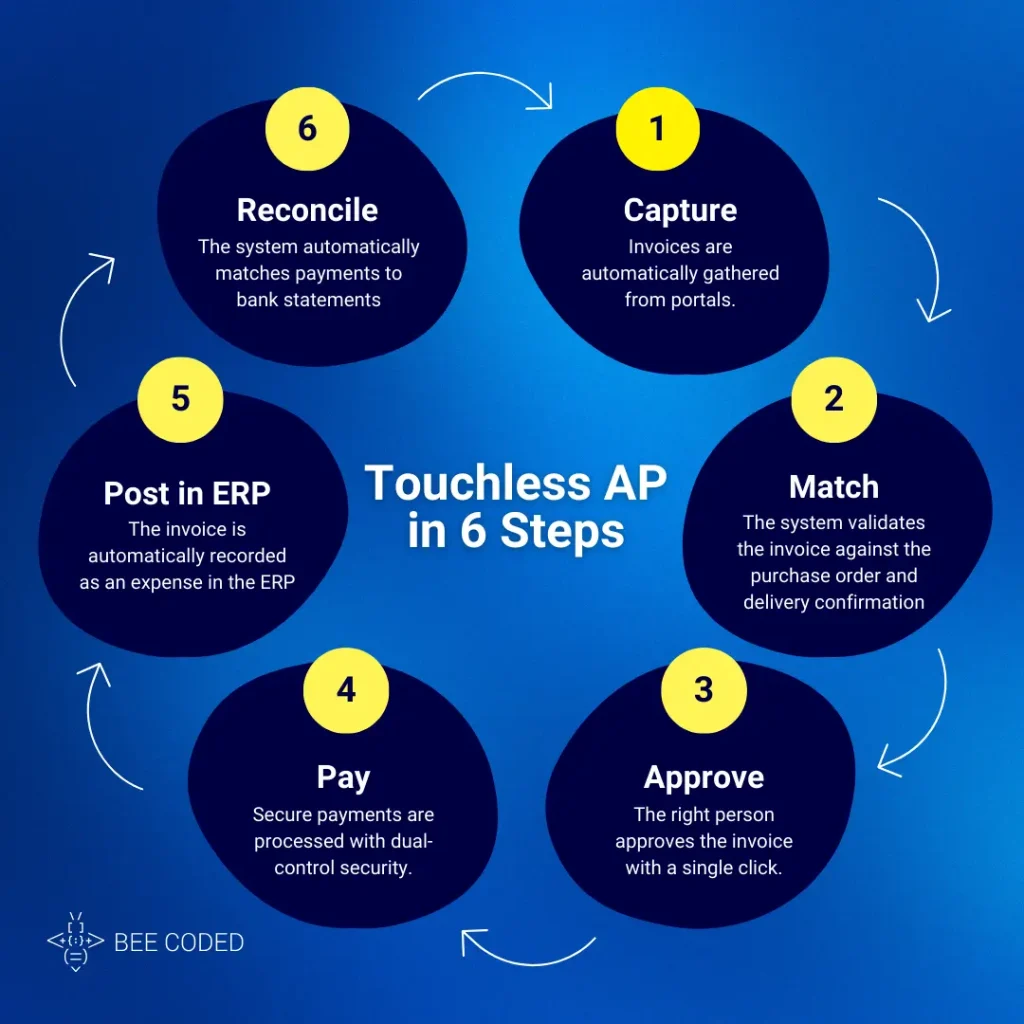
- Step 1: Automatic invoice capture
- Step 2: Controls & Matching
- Step 3: Simplified approval
- Step 4: Secure and on-time payments
- Step 5: Posting in ERP
- Step 6: Automatic reconciliation
- Compliance and trust: Why data security is so important
- A day in the life of an AP Clerk: Before & After
- Is your team ready for AP automation?
- Success metrics to watch
- Conclusion
Contributors


Why are we still losing so much time over invoices?
Why do we still risk drowning in the chaos caused by manually entering data from endless stacks of invoices? Human errors, late payments, lost invoices… a chaos that no longer has a place in a world where there are more than enough resources to simplify this process.
In this article, we’ll discuss AP automation and how it can transform an accounting department overwhelmed by paperwork into a digital hub, where invoices are processed touchlessly.
What does “Touchless AP” mean?
As we can guess from the name, “touchless” means you no longer have to manually process every invoice by hand. So, Touchless Accounts Payable (AP) means processing invoices with minimal human intervention.
How does it work?
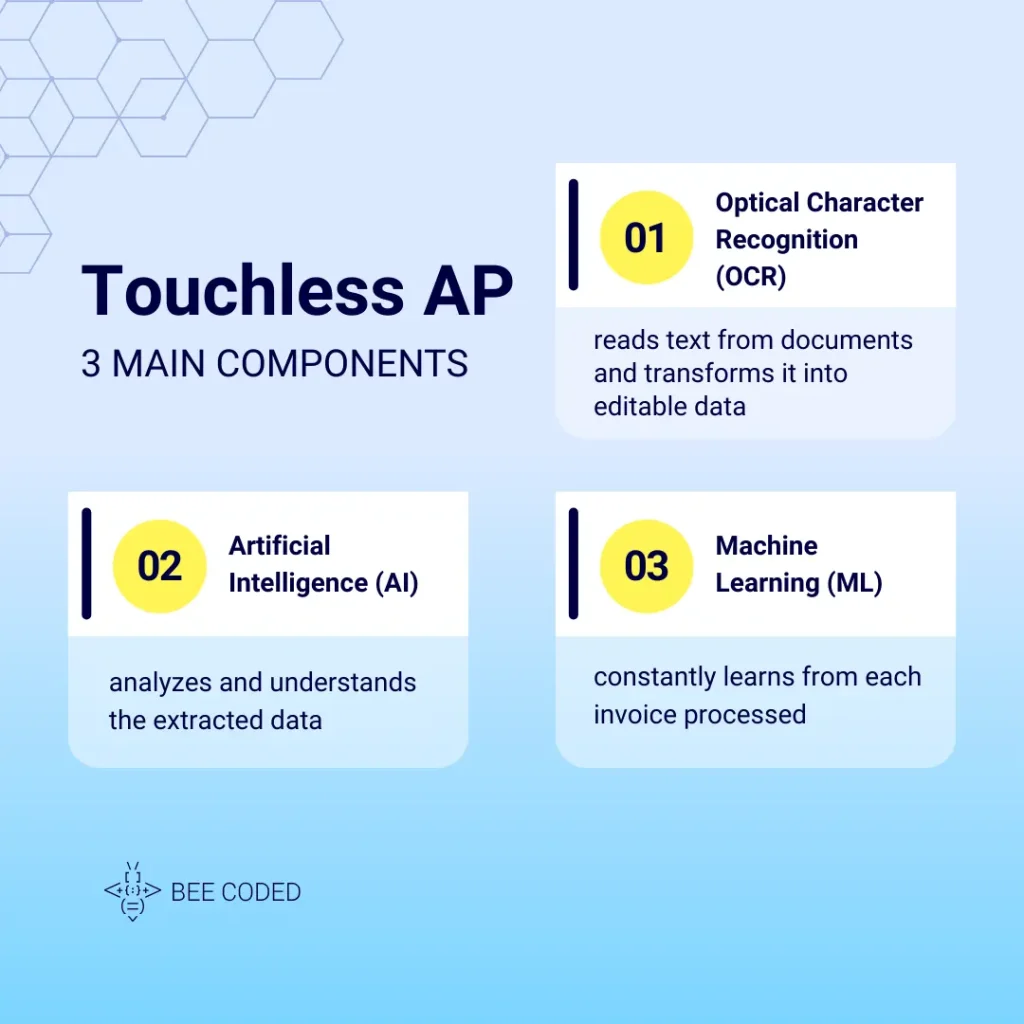
Touchless AP uses three main components:
- Optical Character Recognition (OCR)
OCR reads text from scanned documents or PDF/JPG files and transforms it into editable data. - Artificial Intelligence (AI)
AI analyzes and understands the extracted data. You can look at it as the brain of this process. - Machine Learning (ML)
ML constantly learns from each invoice processed. If today it receives an invoice in a different format, next time it will already know how to handle it.
Thus, human intervention is only needed in special cases, such as illegible data or major mismatches between the invoice and the purchase order.
BEE CODED offers complete integration services for touchless AP automation. And in the next sections, we’ll go through all the steps of this process.
Step 1: Automatic invoice capture
The first step is collecting invoices, no matter where they come from.
Capture from email inboxes and portals
Instead of opening each email and manually downloading attachments, the BEE CODED system automatically scans the inbox, identifies invoices and feeds them directly into the processing flow.
Integration with e-Factura and UBL files
In Romania, e-Factura is mandatory for many transactions. BEE CODED connects directly to the ANAF platform and automatically retrieves electronic invoices in UBL (Universal Business Language) format – a standard that makes data easy to read and process.
Step 2: Controls & Matching
Once the invoice is captured, the system checks if the information is correct.
What is “3-way match” and why does it matter?
“3-way match” compares three documents:
- The invoice received from the supplier.
- The purchase order (PO).
- The goods/services delivery confirmation.
For example, let’s say you ordered 50 chairs at 200 RON each. The confirmation shows you received 50. The invoice says the same: 50 x 200 RON. If everything matches, then the invoice is validated automatically.
Payment tolerances: let the system decide
If differences are minor (e.g., 5 RON due to rounding), the system can approve the payment according to predefined rules, without blocking the process.
Step 3: Simplified approval
Personalized approval, no effort required
There are smart rules that automatically send invoices to the right person. For example: “Marketing invoices over 5000 RON go to the marketing manager.”
One-click approval and detailed history
You approve requests directly from an email or a Teams notification. The system documents everything in a full audit trail.
Step 4: Secure and on-time payments
SEPA Payments: The European Union Standard
SEPA payments allow fast and standardized transfers across the EU, thus simplifying international payments.
Maximum security: dual control
To prevent fraud, the “dual control” rule applies: one person initiates the payment, another confirms it.
Step 5: Posting in ERP
From invoice to official expense
After approval and payment, the system automatically posts the invoice in the ERP, marking it as an “official expense” and attaching the necessary documents for audit.
Step 6: Automatic reconciliation
Hassle-free bank reconciliation
The system automatically links bank statement lines with paid invoices. This way, the month-end closing becomes simple and transparent.
Learn more in our article about How to Reduce Financial Close Time by 3 Days with ERP Workflow Automation.
Compliance and trust: Why data security is so important
We all step carefully when we hear about GDPR. So it’s very important to ensure that we:
- process only the strictly necessary data,
- store it securely,
- carefully control who has access to it.
The BEE CODED team follows all these rules and provides transparent audit logs, so that every step is documented and verifiable.
A day in the life of an AP Clerk: Before & After
In the following table, we’ll illustrate two scenarios: one before AP automation with BEE CODED, and one after.
| Situation | Before AP Automation | After AP Automation |
| Invoices received | Printed, scanned, manually entered | Automatically captured from e-Factura |
| Processing | Data typed manually, error risk | OCR + AI + ML, instant validated data |
| Approval | Email lists, delayed approvals | Automatic notifications, 1-click approval |
| Payments | Bank files filled in manually | Integrated SEPA payments |
| Reconciliation | Days of manual checks | Automatic invoice–payment–statement match |
| Employee role | Data entry operator | Exception solver |
Is your team ready for AP automation?
Before taking the step, make sure everything is well prepared. We’ve put together a checklist of questions as a readiness guide:
- Do you use purchase orders (PO)?
- Where do invoices arrive today (email, portal, paper)?
- Who approves invoices and by what method?
- Which bank are you working with?
- Which accounting ERP do you use?
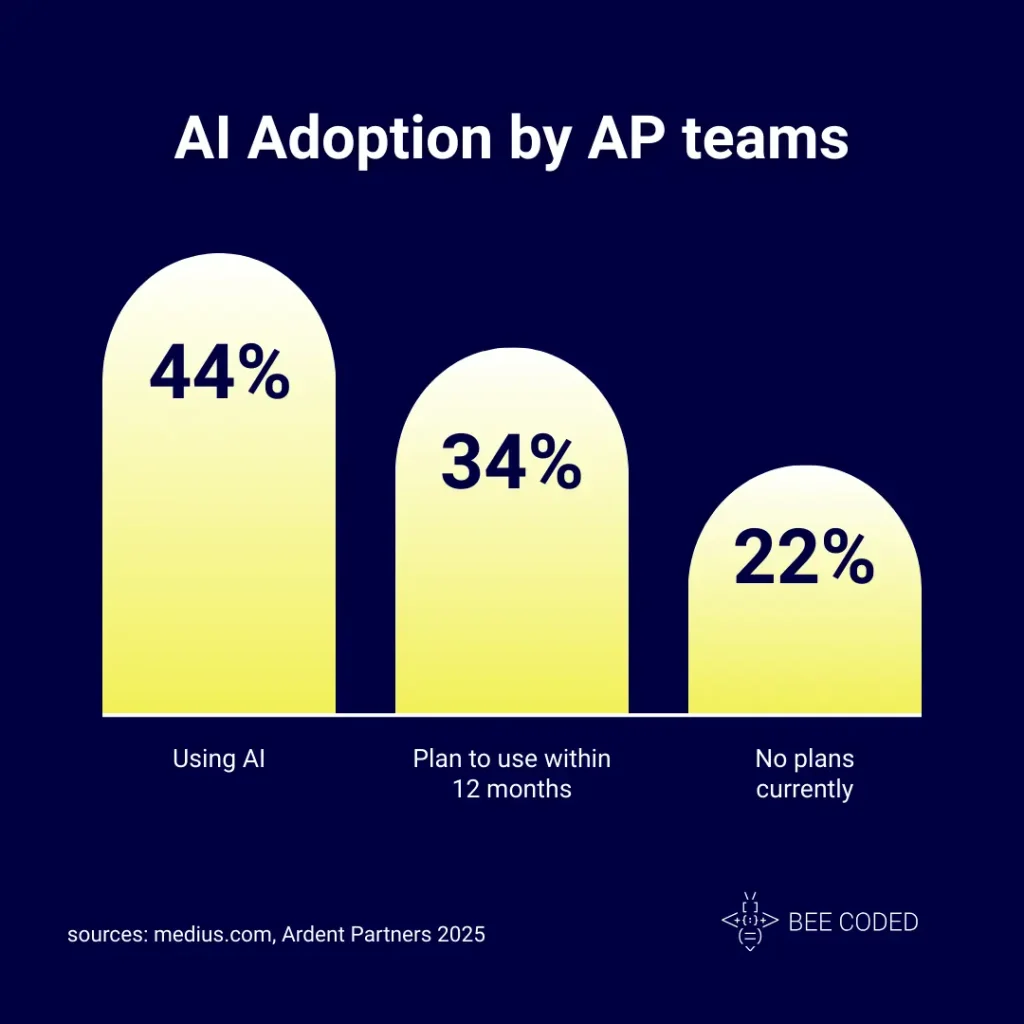
This initial assessment helps you identify the key areas that are ready for automation and reveals the foundational steps you might need to take to ensure a smooth transition.A report by Ardent Partners showed that 77% of finance leaders are either using or plan to use AI in the next 12 months (source: medius.com)
Success metrics to watch
- Average invoice processing time.
- Percentage of invoices automatically approved.
- Penalties for late payments.
- Discounts obtained for on-time payments.
Conclusion
Get rid of the chaos of invoices with accounts payable automation and work on a clear, secure flow that complies with EU regulations.
Book a 30-minute demo flow with the BEE CODED team and see what the future of AP looks like in your company.